Hi @J_Brent_Hall ,
u-blox PointPerfect provides corrections from a network of real and virtual base stations. It is very different to generating your own corrections and passing them from Base to Rover through a service like RTK2go. With PointPerfect, you don’t need your own Base. It would only make sense to connect your Reference Station to PointPerfect if you are using it as a Rover, or are using an “assisted base”.
From your messages, I think you have the following:
You have the Facet in Rover mode
You have paired the Facet with your Android phone on Bluetooth
You have SW Maps running on your Android phone
You have connected SW Maps to PointPerfect NTRIP
SW Maps is pushing corrections to the Facet over Bluetooth
You have RTK Float with an accuracy of ~6 inches
It sounds like most things are working well. The GNSS will stay in RTK Float if: the corrections are old or inaccurate; the GNSS does not have a clear view of the sky.
For the PointPerfect NTRIP Client configuration in SW Maps, please check you have “Send NMEA GGA to Base Station” ticked. PointPerfect needs to know where you are so it can send you corrections for your location, the GGA message contains your location.
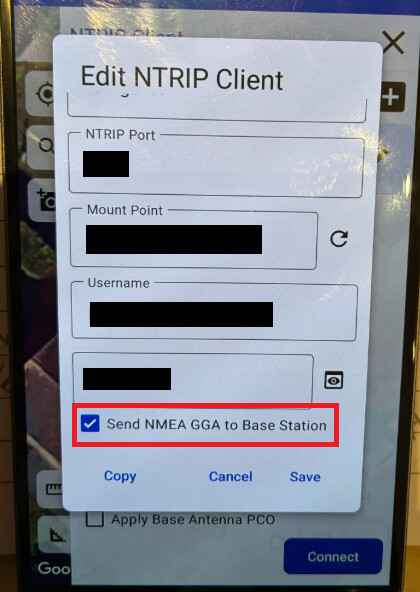
You say you were testing in “a clear area” so that should not be the issue. But please make sure the clear area was truly clear, away from buildings (which can cause signal reflections) and not under trees.
For your Reference Station, please tell us how you are trying to go into config mode. Are you selecting Config using the mode button and the OLED display? Or are you using option W from the serial System Menu?
After a firmware update, we always recommend resetting the settings with a Factory Reset. Please try that - using USB, a terminal emulator and the serial menus if needed.
I hope this helps - best wishes,
Paul