I’m finally back to working on setting up a base station with my Postcard pair. I have my antenna securing mounted on my roof and my Postcard base unit connected by USB to a mini PC. I managed to get through the process of upgrading the LG290P firmware to the latest version.
I believe that I am now ready to collect 24 hours worth of data to know the exact location of my reference station as outlined in this article:
I am having difficulty in cross referencing what this article is showing in U-Center with the U-Center 2 software that I downloaded. Is there anything materially better in U-Center 2 where I should stay with it and go through this process with some other guidance, or should I find the, presumably, older? original? U-Center and just work with that?
u-Center Classic is available for download and works with all the Generation parts, so fine for 9, 10 and X20
You should be able to enable UBX-RXM-RAWX on uCenter 2, and record data to a uc2 file, which should have binary UBX packets in a recoverable form you can use to generate Rinex Observation files.
For Navigation data, or SP3 precise ephemeris, can be pulled from NOAA CORS, or you can enable UBX-RXM-SFRBX.
The Postcard has the Quectel LG290P GNSS module on it. The “How to Build a DIY GNSS Reference Station” tutorial was written for earlier products based on the u-blox ZED-F9P. Your approach will need to be different for the LG290P.
Please tell us more about your setup. From another post, it sounds like you bought both Postcards and Portability Shields? What do you have connected up on the roof - Postcard or Postcard+Shield?
If it is Postcard+Shield, you may want to log the data to the Shield SD card using our RTK Everywhere firmware. If it is just Postcard, you’ll need to log the data on your mini PC.
u-blox u-center isn’t going to work for you. Quectel have their own software called QGNSS. But there are 3rd-party open-source solutions like PyGPSClient too.
Regarding which messages to log, the post linked below should help. It’s a long read but there’s a lot of good stuff in there.
U-center 2 doesn’t really add anything essential for the 24-hour survey-in workflow and the SparkFun guide was written around the original u-center. To avoid confusion and mismatched menus, it’s easier to install the older u-center and follow the article step by step.
Thanks for the reply and for pointing me in the right direction.
You are correct that I did purchase two Postcards and portability shields. I already have two antennas purchased sometime back from AliExpress, I believe it was. At this point I have the antenna mounted on the roof with a coax feed into my network closet. The postcard is literally just hanging from the protruding coax with the other end of the Postcard connected to a USB-C / USB-A cable that connects it to a mini PC. I am not presently using the portability shields. I managed to update the chipset to the latest (LG290P03AANR01A06S) firmware.
My first intended use of the unit is to mark the exact location of a lot of pipe I need to get in the ground. I want mark the pipe’s location before it is backfilled so that I can also have accurate depth information as well as the horizontal location.
I am at the stage of getting the software configured to acquire accurate location information for my base unit as it seems like that is what should happen next. I will read the article that Paul posted and see how far I can take it. I may very well be back with further questions. I’ve already been successful in getting data to show up on the QGNSS software so I hope that is half the battle. I am confused about @PaulZC saying that U-Center (V1 or V2) is not an option for the Postcard but @clive1 and @olivia_49 are writing as if it is.
@David_Jensen, as @PaulZC pointed out, the PostCard uses the LG290P (Quectel), so U-Center (U-Blox) won’t be much help.
Might I suggest 2 easy options:
Use your 2’nd PostCard as a Network RTK Rover (RTN) with PointPerfect NTRIP, no base station required.
Use PointPerfect NTRIP to establish your Base Coordinates, if you really want Base/Rover.
It really doesn’t get any easier than RTN (#1) if you have Cellular/Internet Available.
But we can help you through the process for Static Logging your Base PostCard for Post-Processing it’s position. The link Paul sent is a good starting point.
I think uCenter is mostly agnostic to the source when saving to a file, but obviously isn’t going to send compatible commands to other vendors products.
There are RTCM3 to RINEX tools that should be able to work more generically with data in those forms.
Once commands/packets are enabled generic piping of COM/TTY to a file should suffice for logging purposes, or direct processing of streams in real-time.
Thanks @rftop for your suggestion about trying out the PointPerfect NTRIP service. If that is truly easier than setting up my own reference station, then I probably need to start with that as I very much want to get this water line in before the inevitable winter rains finally arrive and make the project that much more challenging.
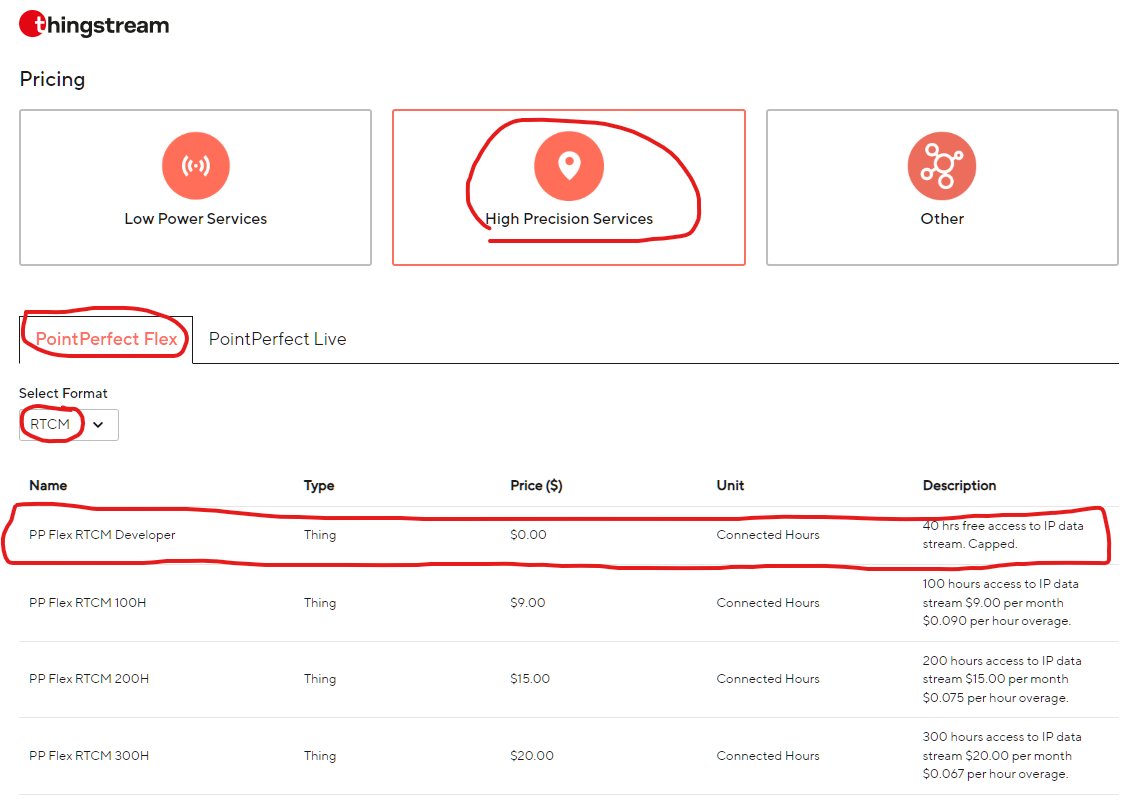
I am completely ignorant of the service and there appears to be multiple options related to PointPerfect. Is this the service that you are suggesting, that also appears to be free for low volume use:
I find this all rather confusing and need to narrow things down so that I can try to get my head around it.
Also, when I look at their coverage map, it appears to show the entire county covered with reference station availability. How is that possible? No mater how far I zoom into the map, it appears to show 100% complete coverage. I’m clearly missing something here.
The developer plan for testing various devices with the PP Service (as a product integrator).
Since we are on the SparkFun Forum, I’d recommend purchasing the PP Flex RTCM plan through Sparkfun
This was the previous link to register for the older IP service:
I’m not sure how SparkFun handles purchasing a PP Flex (RTCM) account. Someone will hopefully chime in… or we can tag @sparky
You want:
Type = PointPerfect Flex
Format = RTCM for NTRIP delivery
I assume you will receive NTRIP credentials (User/password) that you enter into your data collector app (SW Maps, etc). Otherwise, you can also enter those credentials in the Torch Config, but I find it easier to let the App manage the NTRIP connection.
Yup, U-blox/ThingStream has an impressive network of ground stations and other data sources. I’ve found the PP RTCM service to be remarkable everywhere that I’ve tested it (Southeastern US).
Let’s see if we get a response for how to subscribe to the service through Sparkfun. Looks like they will soon be closing for the holidays and opening back up on Monday the 29th.
Hi Folks (I heard a bat signal) - We have a corporate account with u-blox, then resell the PointPerfect service. You’re welcome to setup you own account and save a few bucks a month.
The RTK Postcard can be registered here for monthly service through SparkFun. From there, we’ll get your payment details and setup a monthly payment plan. Additionally, I’ll PM you with free trial NTRIP Credentials that will work for 30 days.
Thanks @sparky. Super heroes know when we’re in trouble. :-).
I’m not sure if it is because u-blox was recently acquired in 11/25 or not, but I think they’re tightening up and not allowing consumer accounts any more.
I had a ticket (#9725) with their customer support regrading my ThingStream domain. The customer service engineer quoted their T&C as the reason for the account termination:
“… Thingstream products and services are for commercial use only and are not intended or suitable for use by an individual consumer, as detailed in our terms & conditions: "PLEASE NOTE THAT U-BLOX PRODUCTS AND SERVICES ARE NOT INTENDED FOR INDIVIDUAL CONSUMER USE. … .”
Ultimately, they decided to allow me to keep my developer account (with no option to convert it to a paid plan) until March 2026 when it will be deleted. I need to sign up for their service with a reseller.
You said “… The RTK Postcard can be registered here for monthly service through SparkFun. From there, we’ll get your payment details and setup a monthly payment plan. Additionally, I’ll PM you with free trial NTRIP Credentials that will work for 30 days. …”
What if we don’t have a postcard, but have a different Sparkfun GNSS device(s) (EVK, GPS-RTK-SMA, …).