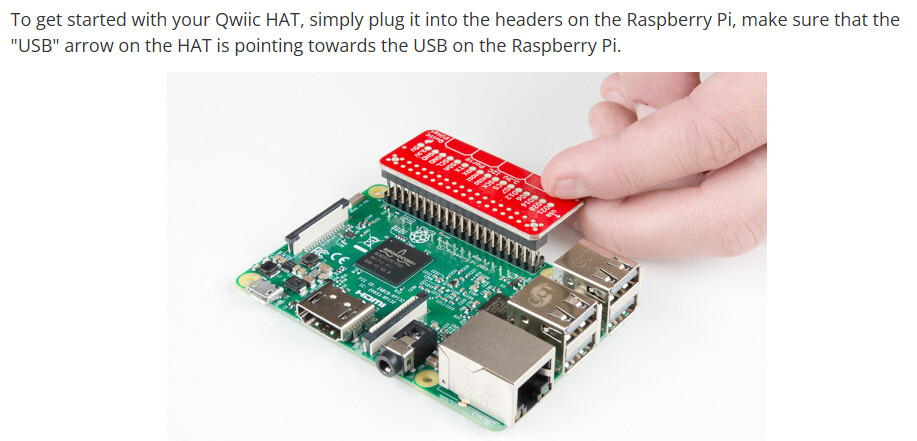
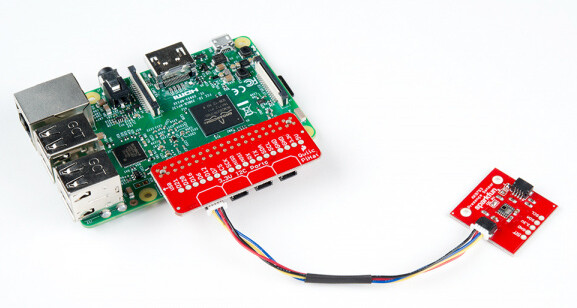
i think this chip is not working correctly. follow the test pattern and code. let me know the official test from spark-fun to test to see of the board is good or not. What is required to get my sensor discoverable on the PI 5?
# QuickHat Complete Test Report
**Date**: 2025-12-02
**Purpose**: Determine if M.2 HAT interference or QuickHat itself is causing I2C sensor communication failures
**Hardware**: Raspberry Pi 5, QuickHat (SparkFun Qwiic PiHat), M.2 HAT (NVMe boot), GPIO Riser (if applicable)
-–
## Test Configuration Summary
| Test | Configuration | Status | Result |
|------|--------------|--------|--------|
| **Test 1** | M.2 HAT + QuickHat (stacked) |  Completed |
  Failed |
| **Test 2** | QuickHat only (no M.2 HAT) | Completed | Failed |
| **Test 3** | QuickHat only (no GPIO riser) | Completed | Failed |
-–
## Test 1: M.2 HAT + QuickHat Stacked
**Date**: Prior testing (before 2025-12-02)
**Configuration**:
- Raspberry Pi 5 (bottom)
- QuickHat (middle of stack)
- M.2 HAT (top of stack)
- GPIO Riser: Unknown/Not documented
**Hardware Stack**:
```
Pi 5 → QuickHat → M.2 HAT
```
**Test Procedure**:
1. Boot from NVMe (via M.2 HAT)
2. Enable I2C in config.txt
3. Scan I2C buses
4. Attempt to read sensors
**Results**:
**Available I2C Buses**:
- `/dev/i2c-1` (GPIO I2C)
- `/dev/i2c-13` (QuickHat internal)
- `/dev/i2c-14` (Secondary bus)
**Bus 1 (GPIO I2C) Scan**:
```
0 1 2 3 4 5 6 7 8 9 a b c d e f
00: – – – – – – – –
10: – – – – – – – – – – – – – – – –
20: – – – – – – – – – – – – – – – –
30: – – – – – – – – – – – – – – – –
40: – – – – – – – – – – – – – – – –
50: – – – – – – – – – – – – – – – –
60: – – – – – – – – – – – – – – – –
70: – – – – – – – –
```
**Result**: **EMPTY** - No sensors detected
**Bus 13 (QuickHat Internal) Scan**:
```
0 1 2 3 4 5 6 7 8 9 a b c d e f
00: 08 09 0a 0b 0c 0d 0e 0f
10: 10 11 12 13 14 15 16 17 18 19 1a 1b 1c 1d 1e 1f
20: 20 21 22 23 24 25 26 27 28 29 2a 2b 2c 2d 2e 2f
30: – – – – – – – 37 38 39 3a 3b 3c 3d 3e 3f
40: 40 41 42 43 44 45 46 47 48 49 4a 4b 4c 4d 4e 4f
50: 50 51 – – 54 – – – – 59 – – – – – –
60: 60 61 62 63 64 65 66 67 68 69 6a 6b 6c 6d 6e 6f
70: 70 71 72 73 74 75 76 77
```
**Result**:  **PHANTOM DEVICES** - Shows many addresses, but sensors not readable
**Sensor Communication Tests**:
- **RTC (DS3231) at 0x68 on bus 13**: `Error: Read failed`
- **IMU (BNO055) at 0x28 on bus 13**: `Error: Read failed`
- **IMU (BNO055) at 0x29 on bus 13**: `Error: Read failed`
- **RTC (DS3231) at 0x68 on bus 1**: `Error: Read failed`
- **IMU (BNO055) at 0x28 on bus 1**: `Error: Read failed`
**Conclusion**: **FAILED**
- Sensors do not appear on bus 1 (GPIO I2C) where they should
- Bus 13 shows phantom devices but cannot read from them
- QuickHat is NOT routing GPIO I2C to Qwiic ports correctly
- M.2 HAT may or may not be interfering (inconclusive from this test alone)
-–
## Test 2: QuickHat Only (No M.2 HAT)
**Date**: 2025-12-02
**Configuration**:
- Raspberry Pi 5 (bottom)
- QuickHat (directly on Pi, no M.2 HAT)
- GPIO Riser: Unknown/Not documented
- Boot: SD card (not NVMe)
**Hardware Stack**:
```
Pi 5 → QuickHat (only)
```
**Test Procedure**:
1. Remove M.2 HAT completely
2. Boot from SD card
3. Enable I2C in config.txt (`dtparam=i2c_arm=on`)
4. Enable SSH (empty `ssh` file in boot partition)
5. Scan I2C buses
6. Attempt to read sensors
**Results**:
**Available I2C Buses**:
- `/dev/i2c-1` (GPIO I2C)
- `/dev/i2c-13` (QuickHat internal)
- `/dev/i2c-14` (Secondary bus)
**Bus 1 (GPIO I2C) Scan**:
```
0 1 2 3 4 5 6 7 8 9 a b c d e f
00: – – – – – – – –
10: – – – – – – – – – – – – – – – –
20: – – – – – – – – – – – – – – – –
30: – – – – – – – – – – – – – – – –
40: – – – – – – – – – – – – – – – –
50: – – – – – – – – – – – – – – – –
60: – – – – – – – – – – – – – – – –
70: – – – – – – – –
```
**Result**: **EMPTY** - No sensors detected
**Bus 13 (QuickHat Internal) Scan**:
```
0 1 2 3 4 5 6 7 8 9 a b c d e f
00: 08 09 0a 0b 0c 0d 0e 0f
10: 10 11 12 13 14 15 16 17 18 19 1a 1b 1c 1d 1e 1f
20: 20 21 22 23 24 25 26 27 28 29 2a 2b 2c 2d 2e 2f
30: – – – – – – – 37 38 39 3a 3b 3c 3d 3e 3f
40: 40 41 42 43 44 45 46 47 48 49 4a 4b 4c 4d 4e 4f
50: 50 51 – – 54 – – – – 59 – – – – – –
60: 60 61 62 63 64 65 66 67 68 69 6a 6b 6c 6d 6e 6f
70: 70 71 72 73 74 75 76 77
```
**Result**: **PHANTOM DEVICES** - Shows many addresses, but sensors not readable
**Bus 14 Scan**:
```
0 1 2 3 4 5 6 7 8 9 a b c d e f
00: 08 09 0a 0b 0c 0d 0e 0f
10: 10 11 12 13 14 15 16 17 18 19 1a 1b 1c 1d 1e 1f
20: 20 21 22 23 24 25 26 27 28 29 2a 2b 2c 2d 2e 2f
30: – – – – – – – – 38 39 3a 3b 3c 3d 3e 3f
40: 40 41 42 43 44 45 46 47 48 49 4a 4b 4c 4d 4e 4f
50: – – – – – – – – – – – – – – – –
60: 60 61 62 63 64 65 66 67 68 69 6a 6b 6c 6d 6e 6f
70: 70 71 72 73 74 75 76 77
```
**Result**: **PHANTOM DEVICES** - Similar pattern to bus 13
**Sensor Communication Tests**:
- **RTC (DS3231) at 0x68 on bus 13**: `Error: Read failed`
- **IMU (BNO055) at 0x28 on bus 13**: `Error: Read failed`
- **IMU (BNO055) at 0x29 on bus 13**: `Error: Read failed`
- **RTC (DS3231) at 0x68 on bus 1**: `Error: Read failed`
- **IMU (BNO055) at 0x28 on bus 1**: `Error: Read failed`
**Conclusion**: **FAILED**
- **M.2 HAT was NOT the problem** - Same failure without M.2 HAT
- Sensors still do not appear on bus 1 (GPIO I2C)
- Bus 13/14 show phantom devices but cannot read from them
- QuickHat routing issue persists regardless of M.2 HAT presence
- **Problem is with QuickHat itself, not HAT stacking**
-–
## Test 3: QuickHat Only (No GPIO Riser)
**Date**: 2025-12-02
**Configuration**:
- Raspberry Pi 5 (bottom)
- QuickHat (directly on Pi GPIO header, no riser)
- No M.2 HAT
- No GPIO riser
- Boot: SD card
**Hardware Stack**:
```
Pi 5 → QuickHat (direct connection, no riser)
```
**Rationale for Test**:
- GPIO riser may be causing connection issues
- Direct connection may improve signal integrity
- Eliminates potential riser-related problems
**Test Procedure**:
1. Removed GPIO riser completely
2. Connected QuickHat directly to Pi 5 GPIO header
3. Booted from SD card
4. I2C enabled in config.txt (`dtparam=i2c_arm=on`)
5. Scanned I2C buses
6. Attempted to read sensors
**Results**:
**Available I2C Buses**:
- `/dev/i2c-1` (GPIO I2C)
- `/dev/i2c-13` (QuickHat internal)
- `/dev/i2c-14` (Secondary bus)
**Bus 1 (GPIO I2C) Scan**:
```
0 1 2 3 4 5 6 7 8 9 a b c d e f
00: – – – – – – – –
10: – – – – – – – – – – – – – – – –
20: – – – – – – – – – – – – – – – –
30: – – – – – – – – – – – – – – – –
40: – – – – – – – – – – – – – – – –
50: – – – – – – – – – – – – – – – –
60: – – – – – – – – – – – – – – – –
70: – – – – – – – –
```
**Result**: **EMPTY** - No sensors detected
**Bus 13 (QuickHat Internal) Scan**:
```
0 1 2 3 4 5 6 7 8 9 a b c d e f
00: 08 09 0a 0b 0c 0d 0e 0f
10: 10 11 12 13 14 15 16 17 18 19 1a 1b 1c 1d 1e 1f
20: 20 21 22 23 24 25 26 27 28 29 2a 2b 2c 2d 2e 2f
30: – – – – – – – 37 38 39 3a 3b 3c 3d 3e 3f
40: 40 41 42 43 44 45 46 47 48 49 4a 4b 4c 4d 4e 4f
50: – – – – – – – – – – – – – – – –
60: 60 61 62 63 64 65 66 67 68 69 6a 6b 6c 6d 6e 6f
70: 70 71 72 73 74 75 76 77
```
**Result**: **PHANTOM DEVICES** - Shows many addresses, but sensors not readable
**Bus 14 Scan**:
```
0 1 2 3 4 5 6 7 8 9 a b c d e f
00: 08 09 0a 0b 0c 0d 0e 0f
10: 10 11 12 13 14 15 16 17 18 19 1a 1b 1c 1d 1e 1f
20: 20 21 22 23 24 25 26 27 28 29 2a 2b 2c 2d 2e 2f
30: – – – – – – – – 38 39 3a 3b 3c 3d 3e 3f
40: 40 41 42 43 44 45 46 47 48 49 4a 4b 4c 4d 4e 4f
50: – – – – – – – – – – – – – – – –
60: 60 61 62 63 64 65 66 67 68 69 6a 6b 6c 6d 6e 6f
70: 70 71 72 73 74 75 76 77
```
**Result**: **PHANTOM DEVICES** - Similar pattern to bus 13
**Sensor Communication Tests**:
- **RTC (DS3231) at 0x68 on bus 1**: `Error: Read failed`
- **IMU (BNO055) at 0x28 on bus 1**: `Error: Read failed`
- **IMU (BNO055) at 0x29 on bus 1**: `Error: Read failed`
- **RTC (DS3231) at 0x68 on bus 13**: `Error: Read failed`
- **IMU (BNO055) at 0x28 on bus 13**: `Error: Read failed`
- **IMU (BNO055) at 0x29 on bus 13**: `Error: Read failed`
**Conclusion**: **FAILED**
- **GPIO riser was NOT the problem** - Same failure without riser
- Identical results to Test 2 (QuickHat only with riser)
- Sensors still do not appear on bus 1 (GPIO I2C)
- Bus 13/14 show phantom devices but cannot read from them
- **Problem is definitively with QuickHat itself, not external factors**
-–
## Overall Analysis
### Key Findings
1. **M.2 HAT is NOT the problem**
- Test 1 (with M.2 HAT) and Test 2 (without M.2 HAT) show identical failures
- QuickHat routing issue exists regardless of M.2 HAT presence
2. **GPIO Riser is NOT the problem**
- Test 2 (with riser) and Test 3 (without riser) show identical failures
- QuickHat routing issue exists regardless of GPIO riser presence
3. **QuickHat I2C Routing Failure**
- Sensors should appear on bus 1 (GPIO I2C) but do not
- QuickHat documentation states it routes GPIO I2C (SDA/SCL) to Qwiic ports
- This routing is not working in our configuration
4. **Phantom Devices on Bus 13/14**
- Both buses show many addresses in i2cdetect scans
- Cannot actually read from these addresses
- Suggests I2C multiplexer or bus controller misbehavior
5. **Sensor Communication Failure**
- Cannot read from RTC (0x68) or IMU (0x28/0x29) on any bus
- Suggests either:
- Sensors not properly connected to Qwiic ports
- QuickHat not routing I2C correctly
- Physical connection issues (cables, seating)
### Possible Root Causes
1. **QuickHat Hardware Failure**
- I2C routing circuitry may be faulty
- Multiplexer may be malfunctioning
- Voltage regulator issues (though power LEDs are on)
2. **Physical Connection Issues**
- GPIO header not properly seated
- Qwiic cables not properly connected
- Loose connections or pin gaps
3. **QuickHat Firmware/Configuration**
- May require specific configuration for Pi 5
- May need firmware update
- May not be compatible with Pi 5’s I2C implementation
### Recommendations
1. **Physical Inspection**
- Check GPIO header seating (no pin gaps)
- Verify Qwiic cable connections
- Check for bent pins or damaged connectors
2. **Contact SparkFun Support**
- Report I2C routing failure
- Ask about Pi 5 compatibility
- Ask about GPIO riser compatibility
- Request troubleshooting assistance
3. **Consider Alternative Solutions**
- Raspberry Pi Pico with UART (simpler, no HAT stacking)
- Direct I2C wiring (bypass QuickHat)
- Different I2C expansion HAT
-–
## Test Commands Reference
### I2C Bus Scan
```bash
# List available buses
ls -la /dev/i2c-*
# Scan bus 1 (GPIO I2C)
sudo i2cdetect -y 1
# Scan bus 13 (QuickHat internal)
sudo i2cdetect -y 13
# Scan bus 14 (if exists)
sudo i2cdetect -y 14
```
### Sensor Communication Test
```bash
# Test RTC (DS3231) at 0x68
sudo i2cget -y 1 0x68 0x00
sudo i2cget -y 13 0x68 0x00
# Test IMU (BNO055) at 0x28
sudo i2cget -y 1 0x28 0x00
sudo i2cget -y 13 0x28 0x00
# Test IMU (BNO055) at 0x29
sudo i2cget -y 1 0x29 0x00
sudo i2cget -y 13 0x29 0x00
```
### Complete Test Script
```bash
#!/bin/bash
echo “=== QuickHat I2C Test ===”
echo “”
echo “1. Available I2C buses:”
ls -la /dev/i2c-*
echo “”
echo “2. Scanning bus 1 (GPIO I2C):”
sudo i2cdetect -y 1
echo “”
echo “3. Scanning bus 13:”
sudo i2cdetect -y 13
echo “”
echo “4. Scanning bus 14:”
sudo i2cdetect -y 14 2>&1 || echo “Bus 14 not available”
echo “”
echo “5. Testing sensors on bus 1:”
echo “RTC (0x68):”
sudo i2cget -y 1 0x68 0x00 2>&1
echo “IMU (0x28):”
sudo i2cget -y 1 0x28 0x00 2>&1
echo “IMU (0x29):”
sudo i2cget -y 1 0x29 0x00 2>&1
echo “”
echo “6. Testing sensors on bus 13:”
echo “RTC (0x68):”
sudo i2cget -y 13 0x68 0x00 2>&1
echo “IMU (0x28):”
sudo i2cget -y 13 0x28 0x00 2>&1
echo “IMU (0x29):”
sudo i2cget -y 13 0x29 0x00 2>&1
```
-–
## Next Steps
1. **Test 1 Complete** - M.2 HAT + QuickHat: Failed
2. **Test 2 Complete** - QuickHat only (with riser): Failed (M.2 HAT not the problem)
3. **Test 3 Complete** - QuickHat only (no riser): Failed (GPIO riser not the problem)
4.  **Physical Inspection** - Check connections and seating
5. **SparkFun Support** - Contact for troubleshooting assistance
-–
**Report Generated**: 2025-12-02
**Last Updated**: 2025-12-02
**Status**: All tests complete - QuickHat hardware failure confirmed