SparkFun LTE Stick LARA-R6 Not Responding to UART or USB

I’m unable to get the LARA-R6 module to respond to AT commands via UART or enumerate as a USB device. I’ve tested two different LTE STticks with identical results.

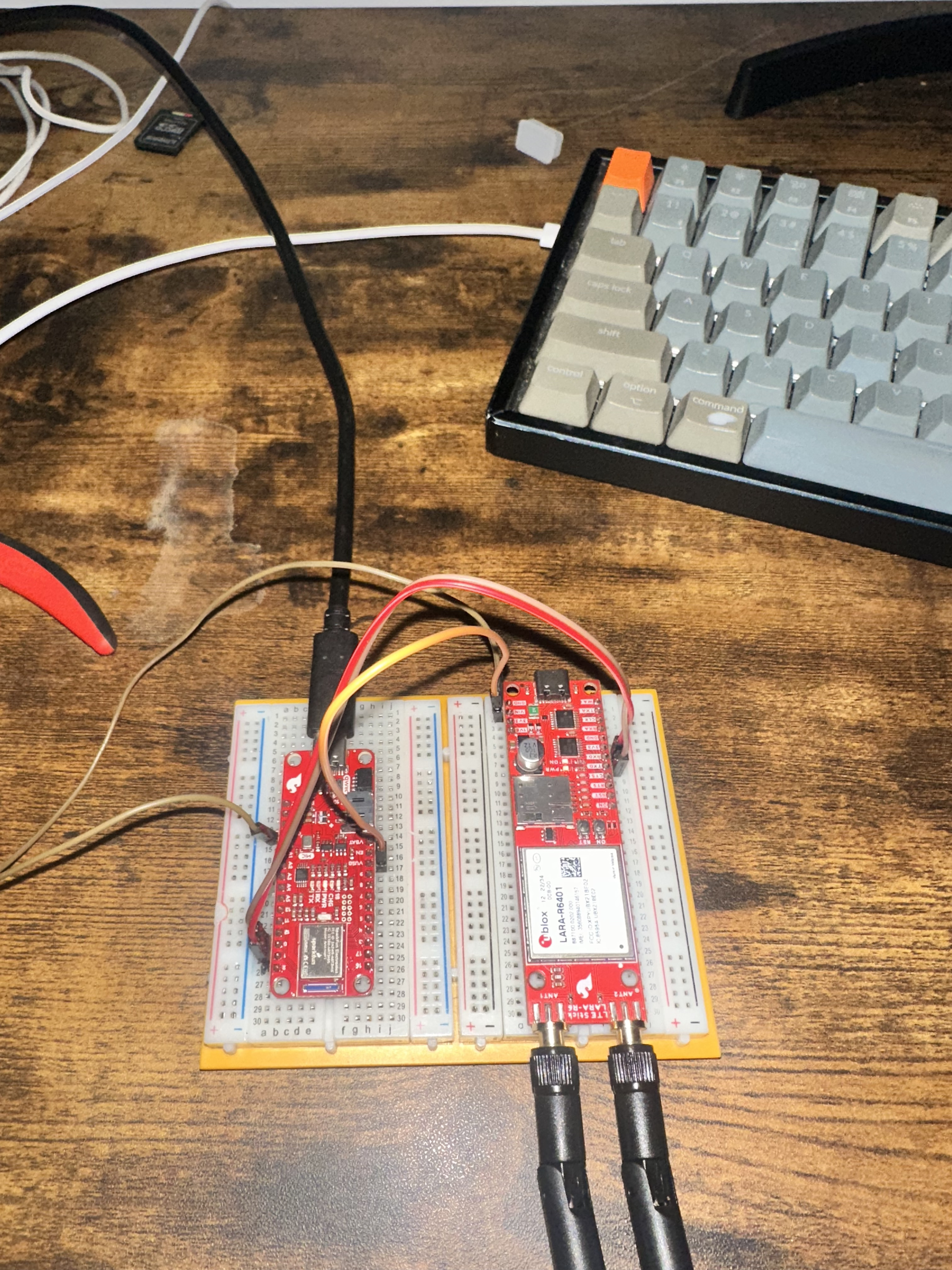
Setup:

  • SparkFun Artemis Thing Plus

  • SparkFun LTE Stick LARA-R6

  • Wiring: Artemis Pin 1 (TX1) → LARA RXD, Pin 0 (RX1) → LARA TXD, VUSB → VIN, GND → GND

  • Power: Via USB-C directly to LARA-R6

  • Code: SparkFun u-blox Cellular Library Example 1

  • Macbook Pro - (Cannot install u-blox m-center)

Troubleshooting completed:

  • Verified Artemis Serial1 working via loopback test

  • Confirmed correct TX/RX crossover wiring with continuity testing

  • Verified all solder jumpers (PWR_LED, ON_LED, DTR) are closed

  • Both PWR and ON LEDs illuminate when powered

  • Tried multiple power-on sequences (tap once, hold 3 seconds to off, etc.)

  • Tested with module powered via both Artemis VUSB and direct USB-C

  • SIM & antenna installed

Result: Module fails autobaud with “Module failed echo test” error. LARA-R6 does not appear as USB device in system. Same behavior on both modules tested.

Any suggestions?
If you do a loopback test the LARA by itself does it work?

I would be happy to try, however before doing so I tried to run this simple loopback test on my artemis:

void setup() {
Serial.begin(115200);
Serial1.begin(115200);
delay(1000);  // Give Serial1 time to initialize
Serial.println(“Serial1 loopback test starting…”);
}

void loop() {
// Clear any junk in the buffer first
while(Serial1.available()) {
Serial1.read();
}

// Send a single character
Serial1.write(‘A’);
Serial1.flush();  // Wait for transmission to complete

delay(50);  // Give time for loopback

if (Serial1.available() > 0) {
char received = Serial1.read();
Serial.print("SUCCESS! Received: ");
Serial.println(received);
} else {
Serial.println(“FAILED - No data received”);
}

delay(1000);
}

Now it too is failing to receive data, this is the second board that is showing this after connecting it to the TXD and RXD pins on the Lara.

For context, this simple text passed on the fresh artemis, I connected and now failed.

Ah, I found something. The LARA is 1.8v Hardware Overview - SparkFun LTE Stick - LARA-R6 Hookup Guide
https://cdn.sparkfun.com/assets/8/9/5/2/1/SparkFun_LTE_Stick_LARA_R6.pdf
and the Artemis is 3.3v, you’ll need a level-shifter to have those chat

Hey

Thanks for your response regarding the voltage levels. However, I need clarification on something in your documentation.

According to your Hardware Overview page, the 1.8V warning specifically states:

“All three of these clusters have test point connections for 1.8V and GND and connect directly to the associated pins on the LARA-R6. These pins are not level-shifted and run at 1.8V logic.”

This warning explicitly refers to the test point clusters (I2C, GPIO, and UART2) on the back of the board - not the main PTH header pins (RXD, TXD, CTS, RTS) that I’m using for UART communication.

Additionally, your Introduction page states:

“The LTE Stick operates at 3.3V logic so make sure your chosen development board operates at the same logic level or use a level shifter.”

Furthermore, your Hardware Assembly guide shows direct connection between the ESP32 Thing Plus and LARA-R6, instructing users to connect VUSB to VIN. As documented in your ESP32 Thing Plus hookup guide, VUSB provides ~5V from the USB connection. The same VUSB pin configuration applies to the Artemis Thing Plus. This is the exact wiring I followed.

Can you please clarify: Are the main PTH header UART pins (RXD/TXD) 3.3V or 1.8V logic? Your documentation consistently indicates they should be 3.3V compatible.

More importantly, regardless of the voltage level question, both LARA-R6 modules fail to enumerate as USB devices when connected directly to my Mac via USB-C. They do not appear in System Information or create any /dev/cu.* devices. Summary of issues:

  • Both LARA-R6 modules do not respond to UART communication from Artemis (3.3V logic)

  • Both modules do not enumerate via USB when connected to computer

  • My Artemis Serial1 port appears damaged after connection attempts - See post above test fails in 2 devices after following hookup guide.

  • Powered via 5V (VUSB to VIN) as shown in your assembly guide

Could you please advise on next steps? I believe these modules may be defective, or broken as a result of following the hookup guide.

Thank you,

Is it possible to get a solution here, I believe I should be issued a refund.

Thanks,

Either that or replacements, whichever you’d prefer - Was it purchased from us? If so head over to Return Policy - SparkFun Electronics (contact vendor if purchased elsewhere) and we’ll get ya squared away