I need technical help. The download example does not have velocity control for the triggers. I have changed things in the download example to try to remedy this. Nothing seems to work.

I’m sorry you’re having issues, but you’re not going to gain many allies by creating multiple posts with inflammatory subject lines. We all do our best to help around here. I don’t personally have the bandwidth to monitor and respond to the forum 24/7, nor can I provide more than occasional help with individual projects. If I think someone has uncovered a bug, then I do my very best to act quickly. But I have yet to see that’s the case here.
I’ve read through your post(s) and I’m not sure what you are trying to do. Triggers are ON/OFF - they don’t have velocity. They create a MIDI Note event with a fixed velocity of 127, which will normally play the sound at 0dB, or full volume. You can reduce it by setting the Max Velocity Gain field to something less than 0dB for the corresponding #NOTE entry in a preset. You can’t go any higher than 0dB, which is the full volume of the wav file.
You can hook the serial port up to a USB-to-Serial converter and then run the Arduino IDE Serial Monitor to interact with the WAV Trigger Pro. Enter the “load preset” command to try loading your preset. This will either provide confirmation that the preset was read and parsed correctly, or offer some diagnostic information if it fails.
Try clearly describing one thing that you are trying to do that isn’t working, such as, “I want trigger 1 to play track 45 at a gain of -3dB, stopping any previous instance of that track”.
The way the wave trigger pros advertise, it seemed to me that you should be able to take normal drum pads. Get the signal to pin 1 through 8 your choice and play at least 8 different Waves per trig input At different levels velocity and panning so forth. Most any drum pad sends a signal via piazo sensor which puts out dc voltage. I was under the impression.The wave trigger pro can take drum trigger voltage and convert it to MIDI\nAnd play the samples.
When I use the download examples on my s.D card the c s v file that came with the wave files wouldn’t work at

all on my wave trigger pro.
When I got rid of that CVS file and replaced it with the download example percussion CS V file. Then I was able to get at least one per pin sample.. I’m not sure if that’s max volume or minimum , but I hear it. number1
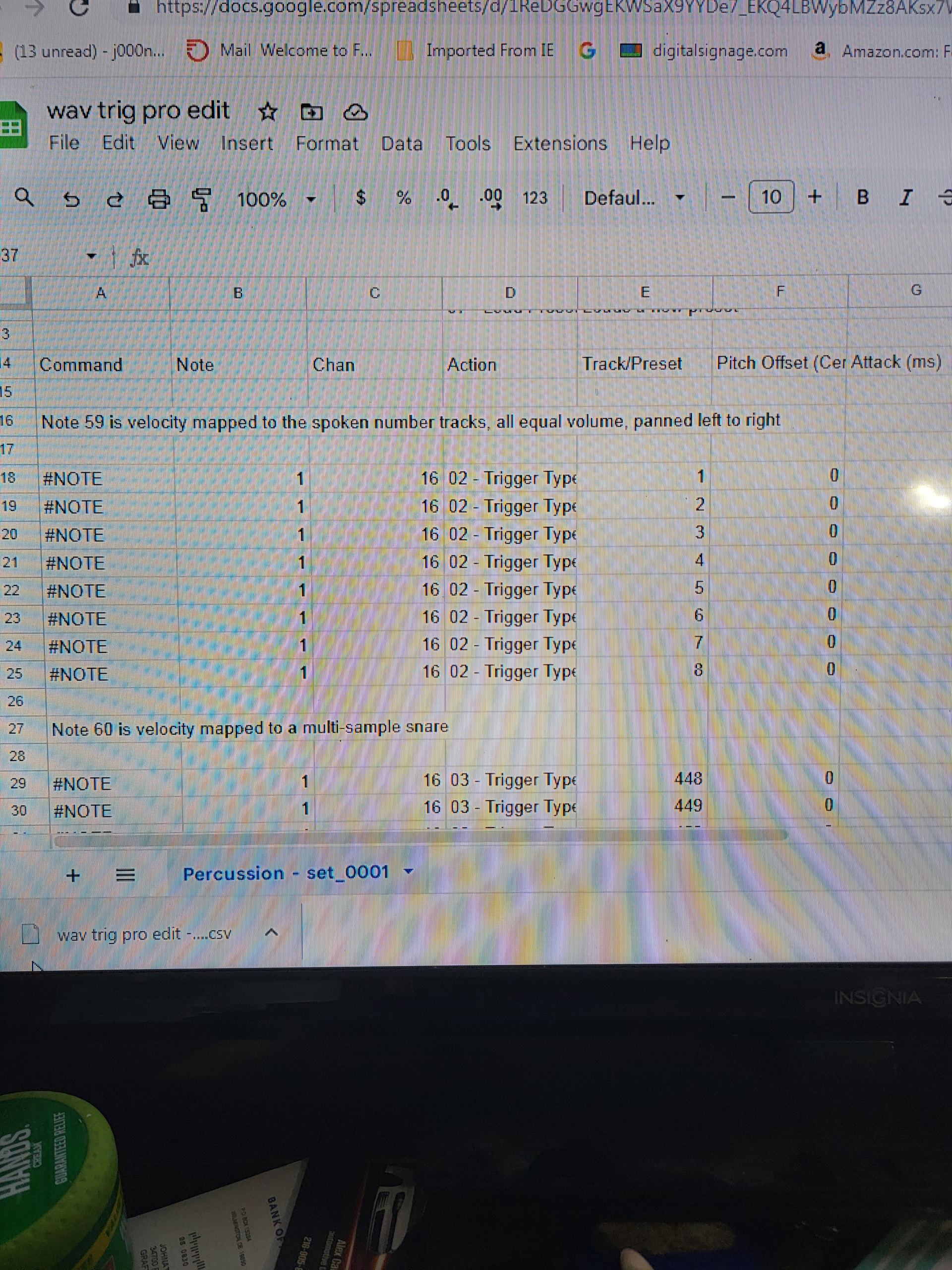
I took the example percussion download file and edited in Google sheets.Like you said, but no changes I make make any difference wave pro responds the same way.
I don’t know why it just poked those pictures in this middle of the message.
So if I made all those changes that you can see in the pictures there, something should have changed. Still just 0001 Number.
I even tried swapping out a wave file to the 0001 slot , and it wouldn’t even play So if I made all those changes that you can see in the pictures there, something should have changed. I even tried swapping out a wave file to the 0001 slot, and it wouldn’t even .play I’m pretty sure I had it named right. How long of a wave can it handle. It was a song saved as wave. When I put the old wave 0001Number that one played again.
You can do all of that if your drum pads output MIDI. I demonstrate most if not all of those functions using a Novation Launchpad in this video. But your last sentence is incorrect. The WAV Trigger Pro’s triggers are just like the trigger inputs on all the other Robertsonics players: Digital inputs that work with either contact closures or 3.3V logic signals. Piezo transducers produce very short, very large voltage spikes (as high as 35V) and require hardware conditioning to extend and limit the signal, and analog inputs with A-to-D converters to get a scaled “velocity” value. These things are not part of the WAV Trigger Pro’s feature set.
Too Bad could have sold a few of them. If you got any little gadgets that change piazo voltage to MIDI, let me know.
Where in the manual did you see this? Did you actually read that or did you just wish that’s what was said because it’s what you wanted it to say?
I think your best bet would be to try to duplicate what is shown in the guides and videos. Get a MIDI drum pad, they can be purchased for less than$100 and can be used with other hardware than the WAV Trigger Pro if you decide to go further than that in the future.
Again, I don’t see this anywhere in any of the provided documentation. Can you provide a source to where you saw this?
. The WAV Trigger Pro supports polyphony and can play and mix up to 24 tracks simultaneously and independently with exceptionally low latency (7ms typically). Control track playback via either 8 programmable trigger inputs.
So you’re telling me pin one trigger input can only play one wav file.0001 on only track one. That Doesn’t seem like programmable trigger inputs.
To be clear… Each of the 8 trigger inputs generates an internal MIDI Note event for the corresponding Note number: Trigger 1 generates a Note On for note number 1, Trigger 2 generates a Note On for note number 2, etc. Without a preset file, these Notes default to playing the corresponding track numbers, 1, 2, etc, at full volume.
However, using a preset file, these note numbers, and hence the triggers, can be modified to start any track number, at any fixed gain (attenuation), with any attack, decay, panning, etc. Furthermore, each note can have up to 8 separate actions, so a single trigger can both stop sounds and start other sounds. The triggers are indeed very programmable.
What they can’t do is provide velocity information, since they are just digital inputs.
This is all documented in the User Manual and demonstrated in the videos.
For some reason , no matter what I do I cannot get trigger 1to play any wave other than wave 0001. Even when I put a different wave number in the slot for track.


This is the command line I changed to try to get pin 1 to to play note one an activate preset four sixty four , which is a crash. If there is something incorrect , please tell me.
I Don’t know what else to do.
Interpreting what you’re trying to accomplish from screenshots is difficult. Please consider what I asked three posts ago: Tell us precisely what you want to happen.
One thing I do see… the Min/Max Velocity Gain fields in the preset are in units of dB, as the spreadsheet comments indicate. 0dB is full volume - you can’t go any higher than that. You have a value of 17, which is not valid.
I also suggested that you hook up the serial port to the Arduino Serial Monitor so you can get some feedback when loading your new preset. It’s likely that your preset is failing to load properly because of an erroneous entry (such as above) and when loading a preset via the Serial Monitor, it will tell you that the preset didn’t load and what line the error is on.
Unfortunately I don’t own this particular WAV trigger board and have no experience with it but I do own and have use some of the others.
I can say they all perform spectacularly and do everything they are claimed to do and do it very well. Robertsonics makes top notch products, I’m sure with a bit more experimentation you will get it figured out.
Okay I want pin trigger one to play channel one. Preset four sixty four. At the loudest volume.
I will change the velocity gain from seventeen to 0
I think you may be mixing up terms. By “Preset four sixty four”, do you mean track 464? That would be the track with a filename such as, “0464_mysound.wav”. By “play channel one”, do you mean you want the track to only play on the left output channel? Is the file mono or stereo?
What do you want to happen if the trigger is activated again while the track is already playing? do you want it to stop the previous instance, or play another copy (polyphonic)?
Sorry to be so picky, but I can’t help unless you can be clear about what you want to have happen.
Sorry , I meant to say track four sixty four. Which is a wave file. I want pin 1to play left and right out. So panning is at 64. Pin one is tied to channel 1 but I had the channel setting at sixteen , because that’s supposed to be omni. Is pin one also considered note one? Should I not use a note number if i’m using the pin?
I’m using the downloaded example.You guys gave me with the samples on it. The percussion download. You can use trigger three action.
I m mostly interested in seeing you tell me how to make trigger pin one play track four sixty four.
Eventually , I will want the same thing to play a different PRESET no matter what number. I’m just trying to make this thing function.
I understand most of the parameters I’m just not getting any Results. Velocity gain is the only one that’s confusing to me. It seems I would have to have a negative 127 for min and 0 for maximum volume to do some things I wanna do. But I won’t worry about that for now.I just wanna see pin one play a different wave track OTHER THAN 1. I just Got off work and I haven’t had time to mess with it yet today.
That last screenshot I sent you should do it except for the volume gain being seventeen.
Here is a Google Sheets preset that programs the first four triggers:
Trigger 1 plays track 464 full volume. Won’t allow retrigger until track completes.
Trigger 2 plays track 464 full volume. Stops previous instance if playing.
Trigger 3 plays track 464 at -6dB. Mixes multiple instances (polyphonic)
Trigger 4 plays track 464 full volume, pitched up one semi-tone. Plays until trigger released, then stops with 2s release.
Here is a .zip file containing my track 464 audio .wav file and the set_0001.csv file.
Make your own copy of the Google Sheets preset file. After you make changes, download as “csv”, rename to set_0001.csv and copy to the microSD card.