RTK Everywhere 2.3 - RTCM message

Hi folks (and @PaulZC),
Searched but didn’t find anything on this topic. Wanted to run it by here before opening anything on https://github.com/sparkfun/SparkFun_RTK_Everywhere_Firmware/issues.

Running RTK_Everywhere_Firmware_v2_3.bin on SparkFun RTK EVK.

I noticed a couple things watching/parsing RTCM3 messages coming out the TX2 (ZED-F9P UART2) port on the terminal block:

  1. In Base mode, RTCM3 messages start being sent as soon as the survey begins. I would think they should start only after the survey completes?
  2. RTCM3 message rates (Serial menu: Configure GNSS Messages → Set RTCM Messages ) after resetting to factory defaults all show 0, yet RTCM3 messages are being sent out TX2 (again, immediately after starting Base mode survey-in). If changed (say set Message RTCM_1005: 1), they appear to stay. If the EVK is rebooted, they appear to stay as well. So they appear to be active but show 0 only after resetting to factory defaults.

Thoughts?

Only 1005 is gated via completion of Survey or Fixed Position.

The other MSM4 or MSM7 will output.

Hi Doug (@doug_f ),

Just FYI: the way the GNSS is configured by RTK Everywhere is changing. In the next release, that part of the code will be very different. In 2.3, the configuration is defined by Base vs. Rover mode and the entire Base or Rover configuration is applied - when changing mode or making settings changes within that mode. In the next release, the configuration is much more selective and only changes to the configuration are applied. The pointers I give below are only valid for versions up to 2.3.

For the EVK, the relevant code is in GNSS_ZED.ino. configureBase will apply the settings RTCM message rates on UART2. configureBase is called when you enter Base mode and also if you make changes to the Base settings while in Base mode. A flag called gnssConfiguredBase indicates if the settings have been applied; if the settings are changed, that flag is cleared to allow the settings to be re-applied.

As Clive says, most of the RTCM messages will be output as soon as they are enabled. 1005/1006 will be output when survey-in is complete or a fixed-Base position is configured. I think this explains why you see messages being output when you might not expect to?

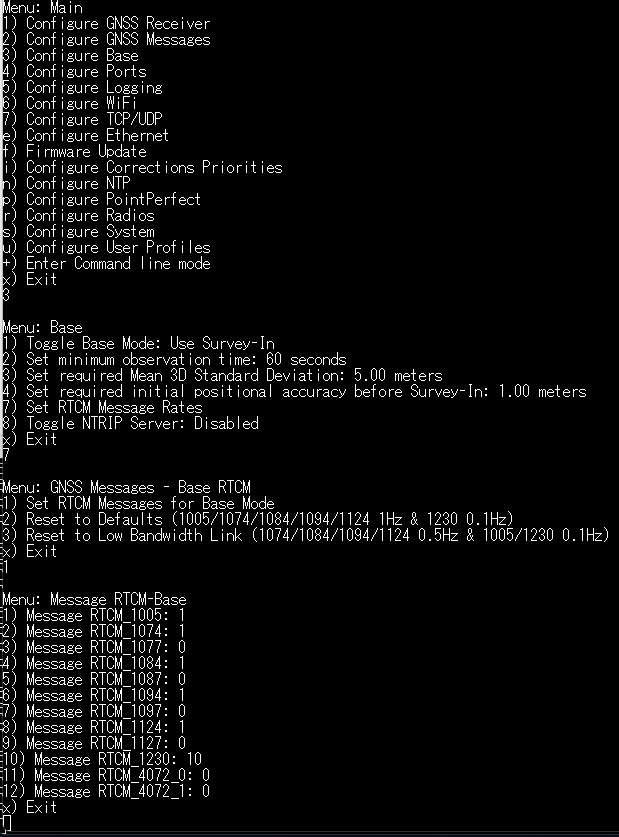
The default Base RTCM message rates are defined in GNSS_ZED.h: 1005,1074,1084,1094,1124 are set to a rate of 1; 1230 is set to a rate of 10 (output every 10th cycle).

Performing factoryReset will set the message rates back to their default. There is a small piece of code which sets all Rover RTCM rates to zero. For Base, the defaults are as defined in GNSS_ZED.h. As soon as you enter Base mode, those defaults will be applied because the gnssConfiguredBase flag is also cleared by the factoryReset.

To zero the RTCM message rates in Base mode, you would need to enter Base mode first, then zero the rates, then apply those rates by exiting the menu.

The message rates are also saved in the ZED internal flash memory. If you reboot the EVK, the message rates are restored by the ZED itself.

Long story short, I think everything you’ve described is as expected?

Best wishes,
Paul

Thanks @clive1 & @PaulZC.

I wrote some code to parse & display RTCM message attributes - so I saw what you described.

I’m surprised RTCM messages are sent immediately, even during a survey-in. IMO it seems counter-intuitive since a fixed location for the base has not been established. But then I haven’t read the spec in detail. :slight_smile:

Paul, I do think there is still a small inconsistency with RTK Everywhere after factoryReset. As you mention, in Base mode the RTCM messages start immediately at the default rates. However, if you pull up the RTCM message rate menu, all message types show a rate of 0. To me, if RTK Everywhere is using the default rate values, the menu should reflect the same.

Your thoughts? Not a big issue, but worth mentioning.

Doug

Thanks Doug (@doug_f ),

After a Factory Reset on EVK, I see the following in Base \ RTCM Messages:

It looks OK to me… Are you looking at the Rover RTCM Message rates? Those are all zero.

Best wishes,
Paul

The MSM messages are observations, not corrections in the adjustment sense.

The Rover receiver can solve for the Base position, it’s just not anchored in a way a “difference” can be computed.

The moving base doesn’t use 1005, and RINEX generation would be fine without the base position. The data could perhaps be used real-time by Matlab or RTKLIB.

Not sure if receiver can use it for DGNSS or to speed/maintain an RTK or carrier smoothed solution.

In earlier firmwares, perhaps M8P, all messages where gated by time mode. Could probably synthesize from ECEF position reporting or current Survey-In estimate.

1 Like

Thx Paul.

No, I was in to Base mode when I checked.

Maybe this explains it.

The path you took was Configure Base —> Set RTCM Message Rates, and your default rates appear correctly.

I was on the enable/disable RTCM messages (sorry, rushing I said “rates").

So, shouldn’t that menu show enabled messages rather than 0’s after doing a factoryReset?

Sorry, I’d check myself, but unfortunately we’re driving 1000 miles to Iowa for a funeral at the moment, so I don’t have access to my EVK.

As I said, we were rushing to leave, so I could be mistaken. If you don’t see what I saw, I’ll check and repost when we return home.

Doug

THx @clive1 !

Hi Doug (@doug_f ),

Menu 2 (Configure GNSS Messages), sub-menu 2 (Set RTCM Messages) sets the RTCM message rates for Rover. Is that what we’re discussing? Do we need to make it clearer that those are Rover rates, not Base rates?

Hope your travels go smoothly - all the best,
Paul

Hi Paul (@paulzc),

Menu 2 (Configure GNSS Messages), sub-menu 2 (Set RTCM Messages) sets the RTCM message rates for Rover. Is that what we’re discussing?

Yes.

Do we need to make it clearer that those are Rover rates, not Base rates?

Yes, I think that would help.

I’m flying blind since my EVK is not with me, but from the RTK Everywhere Main menu:

  • if you go down the “Configure Base” menu first, I agree - everything is clear.
  • If instead you go down the "Configure GNSS Messages” menu first, you don’t know which settings are for which mode(s).

The RTK Everywhere docs (both Sparkfun.com & GitHub) aren’t in sync with version 2.3.

However, at some earlier version of RTK Everywhere, https://github.com/sparkfun/SparkFun_RTK_Everywhere_Firmware/blob/main/docs/menu_messages.md (or https://docs.sparkfun.com/SparkFun_RTK_Everywhere_Firmware/menu_messages/)) show Rover & Base clearly labeled:

So I think it would be helpful, especially since the current docs aren’t in sync.

Doug

OK - thanks! Issue opened here:

1 Like