I have the issue, that my RTK Facet does not turn on. I read some similar posts here already, but I think mine is a bit special. Can you provide any advise on how to debug the issue / what component to replace?
Expected behavior:
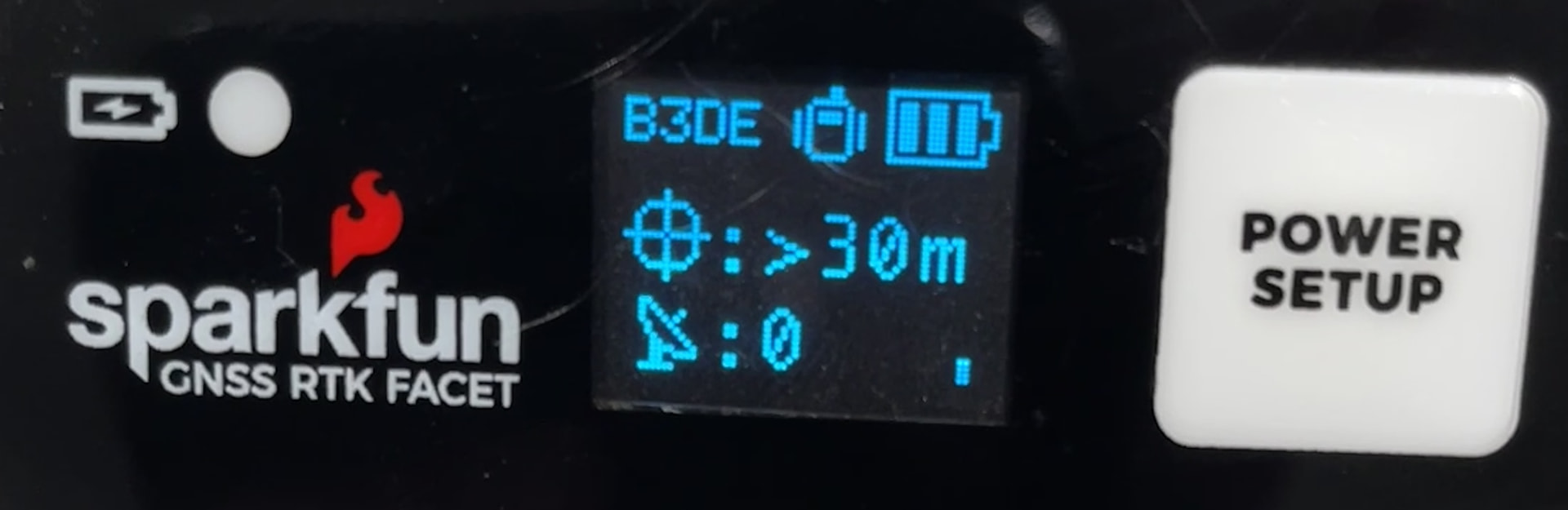
After holding the external button for ~2 seconds usually display will show Sparfun logo and afterwards RTK and a version number before booting to Rover mode.
Observations:
I saw the usual startup behavior as described above many times but did not use the facet for multiple months now. After turning it on again, it does not work as expected anymore. Behavior is as follows:
holding down external button for ~2 seconds, but nothing happens
holding down external button for 10 seconds (to power off) followed by waiting a few seconds and power on again does not help (USB is disconnected to allow power off)
opening the housing and checking internal status - yellow status LED stays on permanently
after disconnecting the battery and restarting, it sometimes works - display stays on, device boots to rover mode, but does not stay there very long. I am not fast enough to connect via Bluetooth
when connecting via USB, I always get the COM port of the F9P and can see standard NMEA messages, so this chip seems to stay active. But the ESP32 does not show up usually. As stated above - sometimes it still works and if it does, and if I am fast enough I am able to access it via the GUI firmware update tool. Once connected, I am able to erase flash and re-flash firmware via the GUI firmware update tool. I flashed it to the latest version 4.4.
Checked:
battery is charged and charging works, details:
battery voltage has been around 4.1V when measuring with multimeter
charging is possible, the green charging LED lights up and goes off after some time once battery is charged
disconnected battery to give it a fresh reboot - sometimes that seems to help, but it is not consistent and usually fails quite fast again
cables look good visually
outside button itself works, inside one works as well
My current suspicion:
Some firmware feature stops the ESP32 from operating (e.g. after sensing a hardware defect). This is because I see that the ESP32 stays active when I erase flash, so I suspect firmware. Alternatively power is not provided consistently enough, but I can measure 3.3V on the main board (pins 1 and 2 of ESP32) and it looks stable.
Questions:
Is there any way to debug why the firmware stops?
Are there any obvious / known reasons for an error like that?
How to fix it? Is it possible to replace a broken component on the main board?
Thank you for your support. I am happy to debug further with your advice.
Thank you for the reply. I am not sure when we purchased it exactly, but it should be at least 1 year ago, probably longer. I can not reach the colleague, that ordered it but will try to reach him.
Some details I can read on the sticker and when powered on are visible in the attached photos:
I suspect display failure. We can replace the display for you if you’d like, or we can send you a replacement. Let us know which you’d prefer.
To confirm if it’s the display, connect USB cable, turn the unit on (as you’ve noted - the internal status LED is solid when powered on), and open a terminal at 115200bps. You should see serial activity. From there, do a system reset (‘s’ystem, ‘d’ebug, ‘r’eset). At the power-on-reset, the device will output a variety of logs including if the display was detected and online. If you can capture that output and post it, we can analyze it further.
Thank you for your reply and the suggestion to debug further via firmware capabilities. Since my unit still is able to at least start sometimes, I managed to get the desired firmware output.
To power it up, I removed the battery and just connected USB. In earlier attempts, this did not always work to get the system up, maybe because of low power reasons if there is no battery connected. But this time it did work. After it started, I attached the battery to help power supply (I think visible in log file, that the Batt Voltage drops at that time from 4.33V to the 4.13V I also get, when measuring battery voltage on multimeter).
I went through the System reset twice and attached the log. After the first reset, the device continued normally. After the second try, it initially booted up fine, but after that went back into non-responsive state (at least on the ESP output, GNSS output continued during that time). You can also see some garbage terminal output at that time. After that it did not respond to any inputs.
I was inside and did have the antenna removed, so getting not time from GNSS is expected of cause.
Nice work! Unfortunately my theory is on thin ice: you can see the display is discovered and started correctly here:
0x3d - SSD1306 (64x48) OLED Driver
To isolate if it’s the battery or not here’s what I recommend: the battery looks to be fully charged. If you disconnect USB, and power on the unit (internal status LED turns on) how long does the LED stay on? The device, without a display, should run for 24+ hours. If, after a few hours, the status LED is still on, I believe the battery is still good, and we have a display failure.
If at any point, you are tired of troubleshooting, please let us know; you can return the unit to us and we’ll get it fixed up. Let us know what you find.
Thank you for the hints. I am testing the battery right now as suggested by you. The internal yellow status LED is on. I powered it up ~8h ago. So it seems to run consistently. I can leave it on for longer to see, but I think the battery looks fine.
I am located in Germany. EIther way of debugging is fine for me: I can either send it over to you or wait for replacement parts and repair the setup here. The second option might be faster and cheaper w.r.t. having only a single shipment instead of two. On the other hand, if you are unsure and would like to hold the unit in hands for debugging and be sure to identify the issue before changing parts based on luck, I can also send it over to you.
Update: The status LED ran for 24h. I now disconnected the battery and stopped the experiment. Battery voltage is at 3.8V now.
The replacement parts arrived yesterday and I took a minute to repair the kit today.
So first of all: Thank you very much for the support and to organize the replacement part shipment during this very busy christmas period.
How the story continued on my side is as follows: Initially my plan was:
reproduce issue with old hardware
replace display board
check if error is gone
When trying to reproduce the error with the original hardware, the system is stable, surprisingly. I can switch it on and off multiple times, tested connecting bluetooth which works, ran the old hardware for >10 minutes stable. Now I was out of options to let it crash, so I put everything back together and tested it outside.
Outcome: Everything works stable again including RTK fix and everything.
The caveat: I do not feel super confident with the setup, since I did not replace any parts of it and did not track the issue down entirely. The only difference to my earlier tests I could imagine is, that the battery has a lower charge now, since I ran the 24h battery test before and did not charge it afterwards. I will charge it fully and will try to reproduce the issue afterwards again to get clarity on the instabilities. If it is only high battery voltage, I can live with it and just operate it in mid-charged condition, but I want to be sure it is, so I do not need to debug any other potential flaws on the board.
Once again: Thank you! Goal has been achieved to bring the setup into a stable state again. Nevertheless, I will try to track the issue further down to get clarity on it and to avoid to get hit by the same error again.
Again, my apologies for a problem unit! I believe what you are experiencing is a known issue. During the production process for the display board, soldering residue can be caught under the connector ribbon. Over time, under the right conditions, small crystalline dendrites can grow between solder pads (they are 0.3mm apart). These conductive growths cause the display to fall. Again, it’s intermittent and hard to predict. Humidity can make the issue worse. We’ve also seen bad displays start working again when they were shipped back to us. We have since changed our production process to more thoroughly clean the residue off the board. After this change, the display issue has been substantially resolved. So, long story short, please use your unit as you see fit. I recommend you change the display and mark and keep the first display for potential future use.
thank you, I will follow your suggestion and replace the old board with the new one shipped by you. I could not reproduce the issue after charging, but your explainations make 100% sense to me. Thanks once more for your reply.