Problem with SW Maps on Ios

Hello All:

My first post; I’m a newbie with a Postcard RTK / Portability Shield.

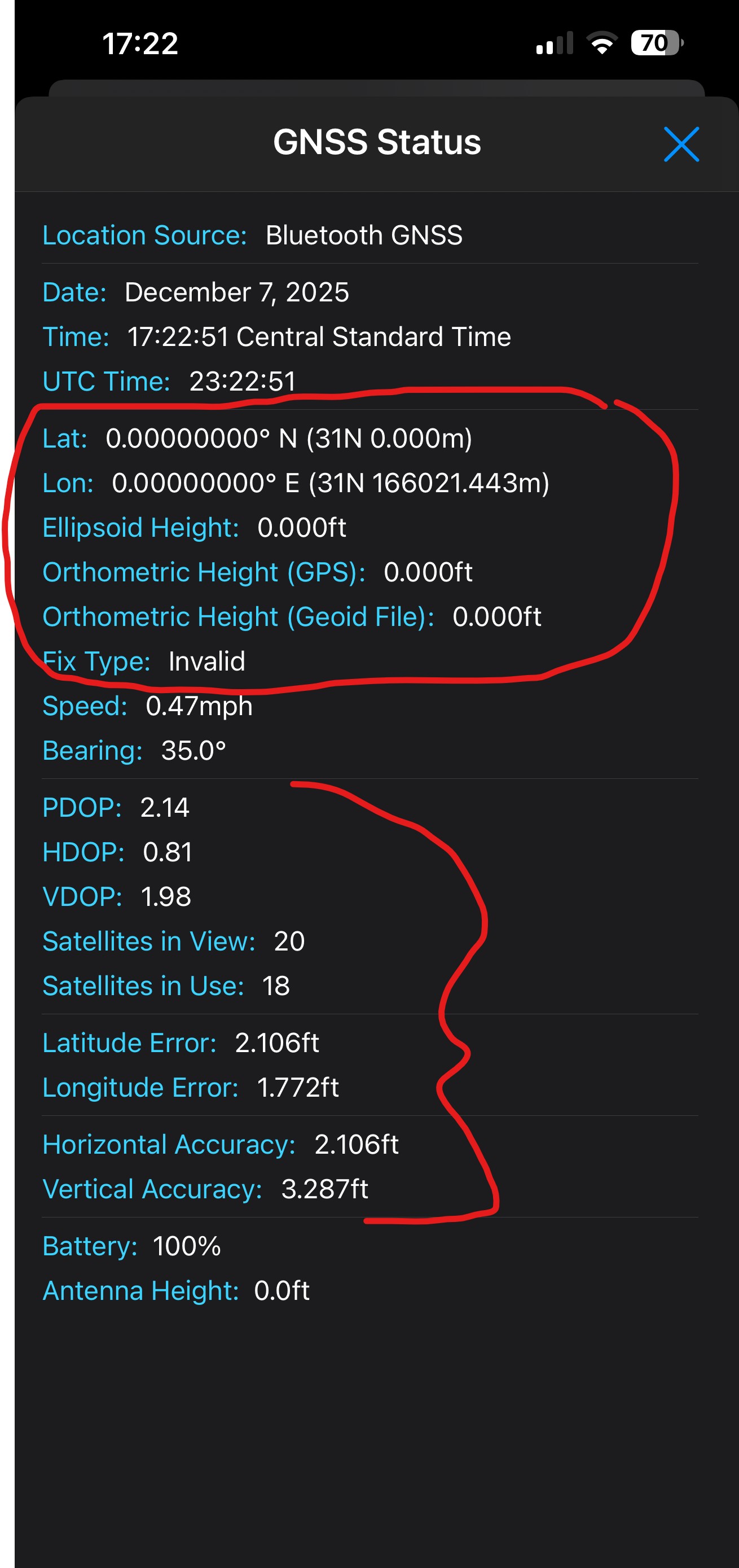
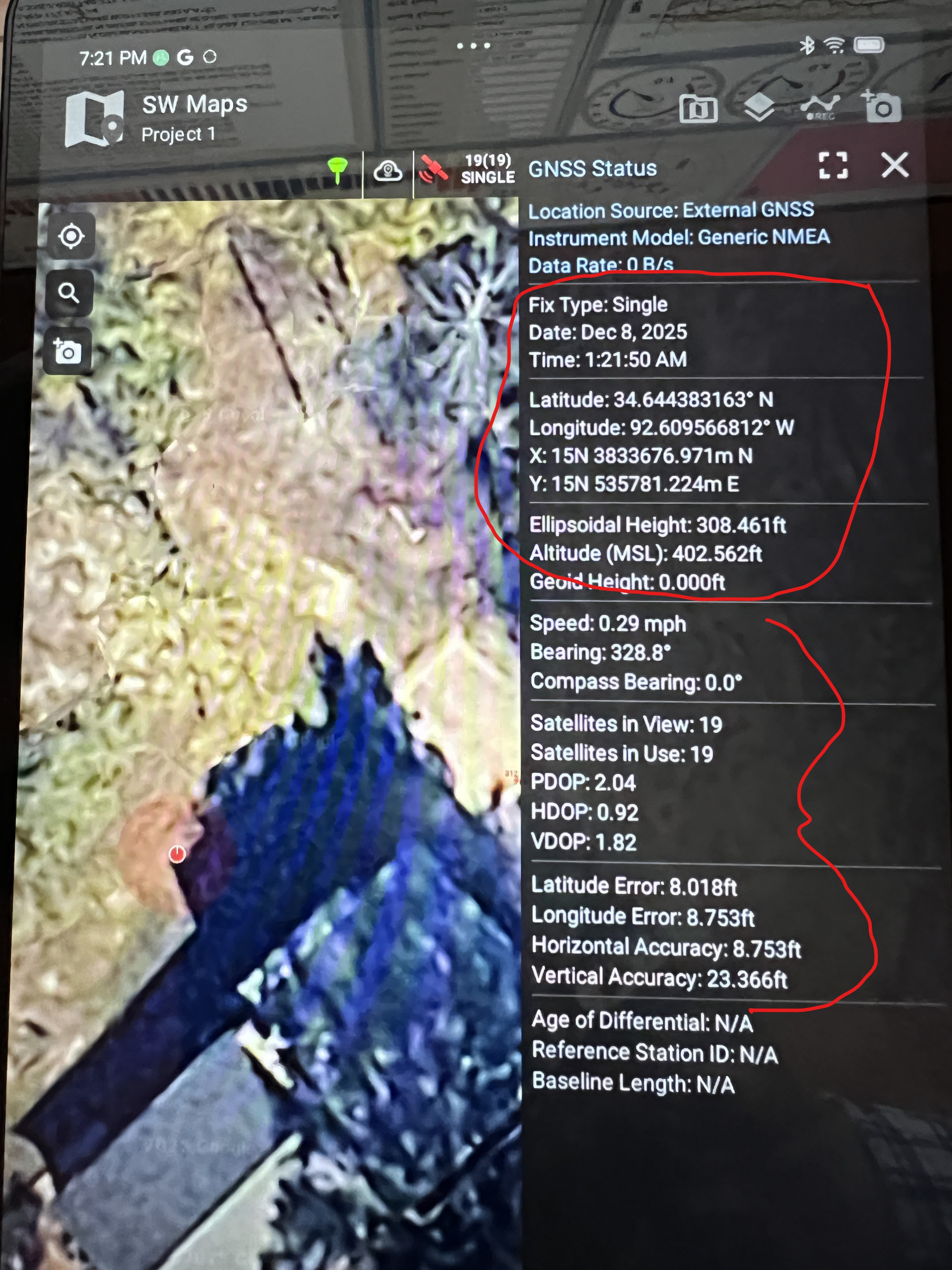
Today, I updated the RTK Everywhere Firmware from Version 2.1 to 2.3. Now, I do not receive Latitude and Longitude readings when using SW Maps on my iPhone nor on my iPad (although I did before the update).

However, SW Maps works fine on my Android tablet. (See photos.)

Any hints on a possible fix?

Welcome @delrod,
I just updated a Postcard to V2.3 and had the same experience as you.
SW Maps iOS V1.2.4

Thanks, rftop.

SW Maps iOS V1.2.4 here also.

I tried uninstalling and re-installing SW Maps , but that did not help.

I pushed the “Reset” Button on the Postcard, which made no difference.

I down-graded to Version 2.1, but the problem persists.

Thanks for confirming that it’s not just me.

Don

I also tried V2.2 and V2.1 (downgraded RTK FW), with no luck.
I also reset to the default NMEA messages.
I also tried connecting as both a SparkFun RTK and a Generic GNSS Device, no change.

I’m guessing this is a problem with SW Maps V1.2.4, as the Postcard still works fine with other Apps.

The strange thing is I tested this Postcard with SW Maps (same V1.2.4) immediately prior to upgrading the FW to V2.3 (that’s a habit). SW Maps displayed the correct position after connecting to a NTRIP source. SW Maps did not work after updating the Postcard to V2.3, or even downgrading. It’s weird that SW Maps functioned fine prior to the FW upgrade. My Previous setup (V2.1 I assume) was sending only RMC, GGA, GSA, and GST messages.

The BLE connection is fine, and even the metadata is coming through…but something is cross-wired with the position on SW Maps V1.2.4.

May be a red herring, but I used an iOS app named “BLESerial nRF” to capture the NMEA output from the Postcard (see screenshot photo below).

The app offers Display Options for Separation of Incoming Messages. I chose “After newline character” as opposed to “After each message”.

It appears that a “newline character” is not being sent at the end of CGA sentences, possibly causing the RMC sentences to be missed???

1 Like

Ah, I agree.
Or (related) due to the GGA’s checksum getting crammed with the RMC message without proper separation.

Hi @delrod (& @rftop ),

Thank you for reporting this. Apologies for the hassle.

Great detective work on finding the missing Line Feeds. To my eyes, this looks like the same issue discussed in Issue 806 (full link copied below).

The solution there was to reset the firmware settings to their default. Options “s r y” from the Menu. Can you please try the same thing and let us know if it solves the issue with SW Maps? If it does, I’ll poke deeper into trying to understand why upgrading to 2.3 creates this issue.

Very best wishes,
Paul

@delrod & @rftop ,

Thanks again for reporting this. We’ve got an issue… I’m documenting it here:

Edit: The work-around is to ensure outputTipAltitude is disabled. This avoids applyCompensationGGA being called and the altitude being modified. But, on Postcard, you either need to Factory Reset the settings (s r y), or edit the settings file on SD by hand. Editing the file is tricky, so please Factory Reset!

It’s a mess. We’ll get this fixed ASAP.

Best wishes,
Paul

@Paul:

Yes, the Factory Reset worked. SW Maps now reports a Latitude & Longitude on my iPhone, as well as o my Android Tablet.

Thank you very much!

Don

No problem Don (@delrod ) - apologies for the hassle,

I’ve added a proper fix for this. It will be included in the next release.

Best wishes,
Paul